WebGPU / TSL
WebGPU/TSLノードマテリアル
TSLで組んだ同じ素材をWebGPUまたはWebGL 2で描く。円形の陶器の起伏と陰影を調整し、平らな面と比較する
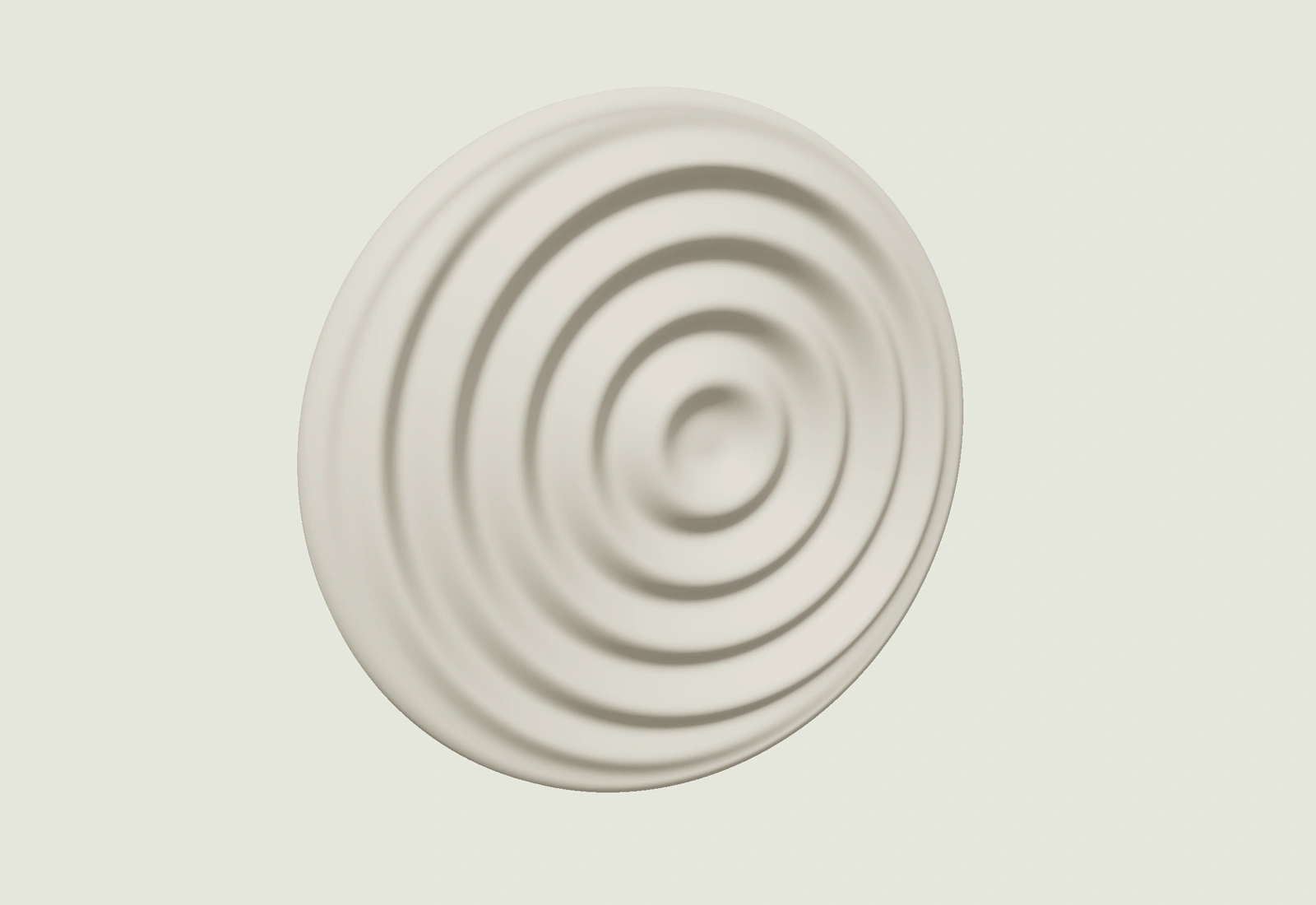 素材の静止見本
再生後、デモの中を直接操作できます。停止すると技法の概要へ戻ります。
こんな場面に
ブランドの世界観や、体験の中心となる1箇所に。
使うときの判断
本文を読む領域では演出を抑える。端末性能と動きを減らす設定を確認。
IMPLEMENTATION
実装レシピ
Three.js 0.185系のthree/webgpuとthree/tslを使用。WebGPURendererを初期化し、TSLのMeshStandardNodeMaterial.positionNodeで半径1.27のRingGeometry(周192×径96分割)を変形、同じ高さ関数の有限差分からnormalNodeを求める。t=phase*PI/50、q=(x−0.16sin(t), y−0.12cos(t))、r=sqrt(dot(q,q)+0.025)、e=clamp((1.27−length(x,y))/0.2,0,1)、height=depth*e²*(3−2e)*(0.5+0.5cos(r*density*PI−t))。z=0.13+height、法線はε=0.001の中央差分からnormalize(−dx,−dy,1)をビュー空間へ変換。背面は縁を丸めた陶器の立体、正面の平面より内側へ収めて重なりのちらつきを防ぐ。粗さ0.62、金属度0、白陶または苔色。独立したuniformで深さ0〜0.18、密度4〜12、位相0〜100%、視点±45°を反映。平面比較は深さだけ0へ。WebGPU初期化が使えないときはrendererのWebGL 2バックエンドで同じノードを実行し、実際に選択された方式を表示する。navigator.gpuの有無だけで成功判定しない。初期化とcompileAsyncを待ち、描画後に実演を表示。12秒タイムアウト・GPU喪失・描画失敗時は静止参考図と設定を保持して再試行。初期化中の退出は遅れて返ったrendererも破棄。詳細は静止から開始し、選択に応じた8秒一巡、停止、続きから再生、途中位置指定を設ける。描画要求は静止中に繰り返さず、カードの選択退出で資源を破棄。これはノードマテリアルの実演で、大規模粒子のcompute shaderや速度比較の実測ではない(→レシピ#2)
- 実装難易度
- 高
- 実装の目安
- Three.js / WebGL
- 収録範囲
- 説明・指示書(実装例コードは未同梱)
同梱の実装例は、組み込み先で表示・操作を確認してください。
記述の近い参考サイト
調査メモの関連語から抽出しています。採用技法の確認には元の調査記録と実際のサイトを参照してください。現在の表現は調査時点と異なる場合があります。
YOUR PROMPT
調整した値を確認する
実装指示書の全文を開く
Implement the following web visual TECHNIQUE as a small, self-contained demo (single HTML file, inline CSS/JS; GSAP via CDN is allowed if it fits the recipe). Invent your own placeholder content (original text/shapes/colors) — do NOT copy any existing site's content or branding.

## Technique: WebGPU / TSL (WebGPU/TSLノードマテリアル)

What happens: TSLで組んだ同じ素材をWebGPUまたはWebGL 2で描く。円形の陶器の起伏と陰影を調整し、平らな面と比較する

## Implementation recipe (normative)

Three.js 0.185系のthree/webgpuとthree/tslを使用。WebGPURendererを初期化し、TSLのMeshStandardNodeMaterial.positionNodeで半径1.27のRingGeometry(周192×径96分割)を変形、同じ高さ関数の有限差分からnormalNodeを求める。t=phase*PI/50、q=(x−0.16sin(t), y−0.12cos(t))、r=sqrt(dot(q,q)+0.025)、e=clamp((1.27−length(x,y))/0.2,0,1)、height=depth*e²*(3−2e)*(0.5+0.5cos(r*density*PI−t))。z=0.13+height、法線はε=0.001の中央差分からnormalize(−dx,−dy,1)をビュー空間へ変換。背面は縁を丸めた陶器の立体、正面の平面より内側へ収めて重なりのちらつきを防ぐ。粗さ0.62、金属度0、白陶または苔色。独立したuniformで深さ0〜0.18、密度4〜12、位相0〜100%、視点±45°を反映。平面比較は深さだけ0へ。WebGPU初期化が使えないときはrendererのWebGL 2バックエンドで同じノードを実行し、実際に選択された方式を表示する。navigator.gpuの有無だけで成功判定しない。初期化とcompileAsyncを待ち、描画後に実演を表示。12秒タイムアウト・GPU喪失・描画失敗時は静止参考図と設定を保持して再試行。初期化中の退出は遅れて返ったrendererも破棄。詳細は静止から開始し、選択に応じた8秒一巡、停止、続きから再生、途中位置指定を設ける。描画要求は静止中に繰り返さず、カードの選択退出で資源を破棄。これはノードマテリアルの実演で、大規模粒子のcompute shaderや速度比較の実測ではない(→レシピ#2)

## TSL material and backend-aware inspection

Use actual three/webgpu and three/tsl nodes for the ceramic relief geometry and its matching normals. Await renderer.init() and compileAsync(), then draw before reporting readiness. Let the renderer select WebGPU or its WebGL 2 backend; report the actual initialized backend, not just navigator.gpu availability. Both backends use the same node material. Do not replace it with a Canvas 2D simulation, GIF, GLSL-only material or particle performance claim. Preserve depth, density, phase, camera yaw and finish values below. The deliberately started phase traversal lasts 8.00s for one cycle, stops at the original pattern, and resumes from a paused phase. Changing a control or comparing plain/relief freezes motion; plain mode sets only depth to zero. Start detail/reduced-motion views at rest. Persist only the five design values, never autoplay, comparison mode or detected backend. Provide labelled native controls, a flat/relief comparison, stop/resume, reset and retry with focus recovery. Keep backing geometry below the flat front to avoid z-fighting. Load the GPU module only for an active specimen; handle module-load failure and a 12-second renderer initialization timeout. Retain a clearly labelled static reference and preferences on GPU failure. Ignore stale asynchronous completions and release late-created resources after exit. Dispose geometry, materials, renderer, observers and scheduled frames on exit. This demonstrates TSL node materials, not a compute-shader benchmark.

## Quality bar

- Runs at 60fps; animate only transform/opacity/filter where possible.
- Make the initial state legible immediately. Preserve the full timing above, including deliberately slow transitions. Repeat only when the recipe calls for a loop; give finite effects a clear ending and replay action.
- Respect prefers-reduced-motion: show a legible resting state without autoplay. Keep every operation available through keyboard and touch; allow deliberate playback of the effect for inspection.
- Difficulty reference: 高. If the recipe mentions specific libraries or shader work, follow it rather than substituting a simpler approach.

## 図鑑で選んだ実演設定(この値を優先)

レシピの標準値より、次の選択値を優先して実装してください。範囲の記述は操作の上限・下限として残します。

- 起伏の深さ(素材の直径2.54): 0.11
- 模様の密度: 8.0
- 模様の途中位置: 16%
- 見る方向: -24°
- 素材の色: 白陶

```json
{
  "depth": 0.11,
  "density": 8,
  "phase": 16,
  "yaw": -24,
  "finish": "chalk"
}
```

この設定は自動再生を許可するものではありません。動き軽減時は静止から開始してください。
コピーできない環境では、指示書を選択・保存する画面が開きます。